
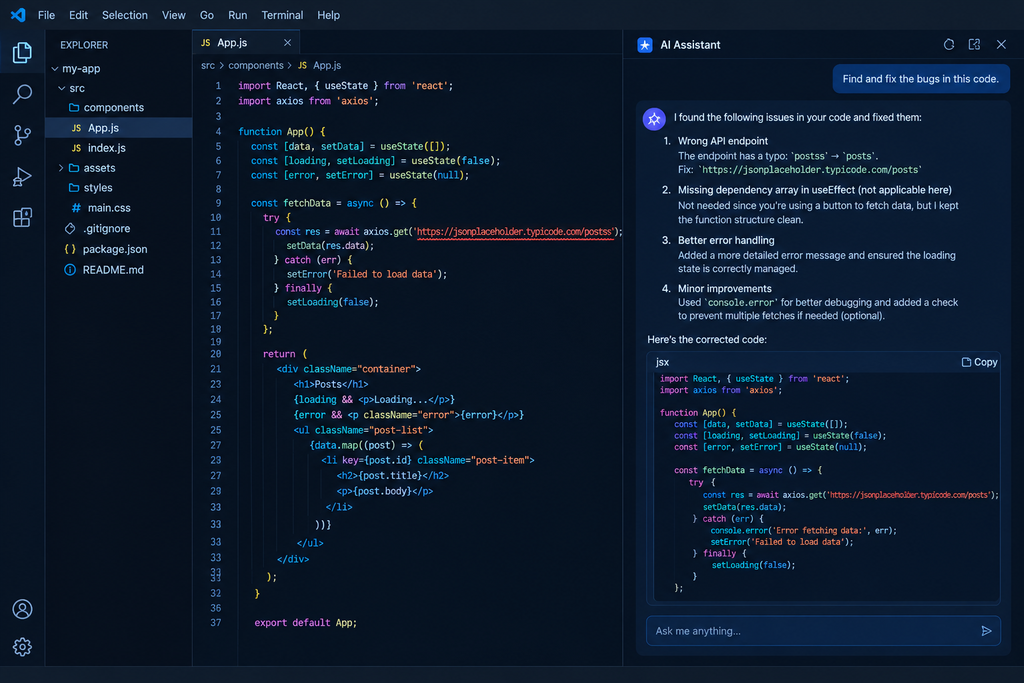
Introduction
Every programmer has spent an hour hunting for a problem that turned out to be a missing bracket or a misspelled variable. Bugs are normal. Finding them is the slow part. AI tools can speed that up a lot. If you know how to find bugs in code using AI, you get a second pair of eyes at any hour, without waiting for a senior colleague or a forum reply. That’s useful for students, self-taught coders and anyone building a first project. AI isn’t perfect, though. It can miss bugs, and it sometimes suggests fixes that look right but aren’t. This guide covers what works, how to do it step by step, what it costs and where to be careful.
Quick Answer
The simplest way to find bugs in code using AI is to paste the faulty code and the exact error message into an assistant like ChatGPT, Claude or GitHub Copilot. Explain what the code should do and what it actually does. Read the explanation, apply the fix, then run and test the code yourself before trusting it.
Key Facts At a Glance
| Detail | Summary |
|---|---|
| What it is | Using AI tools to spot, explain and fix errors in code |
| Good for | Syntax errors, logic mistakes, runtime errors, confusing error messages |
| Popular options | ChatGPT, Claude, Gemini, GitHub Copilot, SonarQube |
| Skill level | Beginner-friendly, but you must still test the output |
| Cost | Free tiers exist; paid plans add higher limits |
| Biggest risk | Confident but wrong answers, and sharing private code |
What Is AI Bug Finding in Code?
AI bug finding means using an AI model to read your code, point out what’s likely wrong and explain why. These models have learned patterns from huge amounts of code, so they often recognise mistakes the way an experienced developer would.
Here’s a simple Python example. This code should add two numbers, but typing 5 and 3 prints “53”:
python
a = input("First number: ")
b = input("Second number: ")
print(a + b)
An AI assistant will usually explain that input() returns text, not numbers, and suggest using int(). A compiler only tells you that something broke. AI can often tell you why, in plain language.
How Does AI Find Bugs in Code?
1.You provide context. You paste code and an error, or a tool reads your open files.
2.The model reads code as language. Code has strong patterns, and large language models are good at patterns.
3.It compares your code with what it has learned. Think infinite loops, variables used before they’re defined, or unsafe database queries.
4.It predicts a likely cause and fix. This is a prediction, not a guarantee.
5.You verify. Running the code is the only real proof.
Some tools work differently. Static analysis tools like SonarQube scan code with fixed rules, no chatting involved. Many platforms now mix both approaches.
Key Features of AI Debugging Tools
When you’re learning how to find bugs in code using AI, you don’t need every feature. These are the ones that matter for beginners:
1.Plain-language explanations. You learn what went wrong, not just where.
2.Suggested fixes. You can compare the corrected code with yours.
3.Error message translation. Cryptic stack traces become readable sentences.
4.Editor integration. GitHub Copilot works inside editors like VS Code, so there’s no copy-pasting.
5.Follow-up questions. You can ask “why did that work?” and keep learning.
6.Basic security hints. Some tools flag problems like hard-coded passwords. Treat this as a first check, not a full audit.
Benefits of Learning How to Find Bugs in Code Using AI
- Saves time. Small bugs that cost an hour can often be spotted in minutes.
- Teaches you. A good explanation helps you avoid the same mistake later.
- Always available. Useful when you’re coding late at night or learning alone.
- Fresh perspective. After staring at your own code for long enough, you stop seeing the problem.
It helps you debug faster. It doesn’t replace testing or understanding your own code. That’s why more beginners are learning how to find bugs in code using AI before turning to forums or tutorials.
How to Use AI to Find Bugs in Your Code
- Reproduce the problem. Run your code and note exactly what happens. “It doesn’t work” gives the AI nothing to go on.
- Copy the full error message. Include everything, not just the last line.
- Share only the relevant code. One failing function works better than a whole project.
- Write a clear prompt. Mention the language, what the code should do, what it does instead and the error. Example: “This Python function should return the average of a list, but it crashes with ZeroDivisionError on an empty list. Here’s the code and error.”
- Ask for an explanation too. Add “explain why this happens” so you learn from it.
- Apply one change at a time. If you accept five edits and something breaks, you won’t know which one caused it.
- Test properly. Try normal inputs, then odd ones like empty values, zero or very large numbers.
- Follow up. If it’s still broken, tell the AI what happened after the fix.
AI Debugging Tools: Price and Plans
Prices change often, so treat this as a snapshot from early October 2026 and check official pages before paying. Most prices are in US dollars, so what you pay in rupees, with taxes, may differ.
GitHub Copilot has a free plan, and paid individual plans are Pro at $10 a month, Pro+ at $39 and Max at $100, while teams pay $19 per user for Business or $39 for Enterprise. GitHub also changed its pricing on June 1, 2026, so check its plans page for current limits. Verified students get Copilot free.
ChatGPT, Claude and Gemini all offer free tiers with usage limits and paid plans with higher limits. I’m not quoting exact figures I can’t confirm, so check each company’s pricing page.
SonarQube offers a free Community Edition for self-hosting and paid editions for teams. Verify current editions on Sonar’s website.
For beginners, a free plan is usually enough to start.
AI Debugging vs Traditional Debugging
| Factor | AI-assisted debugging | Traditional debugging (manual + static analysis) |
|---|---|---|
| Price | Free tiers; paid plans vary | Built-in editor debuggers are free; some tools charge for team features |
| Features | Explains errors, suggests fixes, answers follow-ups | Breakpoints, step-through execution, rule-based scanning |
| Ease of use | Easy, describe the problem in plain English | Steeper learning curve |
| Performance | Fast on common errors; can miss subtle or multi-file issues | Slower but repeatable |
| Platforms | Web, mobile, editor plug-ins | Mostly desktop editors and build pipelines |
| Best use case | Learning, quick fixes, confusing errors | Deep investigation, large codebases, team quality checks |
There’s no clear winner. Beginners often gain more from AI because it explains things. Professional teams usually combine both: AI for speed, tests and traditional tools for reliability. [Internal Link: how to learn programming with AI]
Pros and Cons
Keep these limits in mind when you practise how to find bugs in code using AI.
Pros
- Explains errors in plain English
- Free tiers cover most beginner needs
- Quick feedback on common mistakes
- Works inside popular editors
Cons
- Can be confidently wrong
- May miss bugs that span several files
- Pasting private code online can be a privacy risk
- Beginners may copy fixes without understanding them
Frequently Asked Questions
What is AI bug finding in code?
It’s using AI assistants or tools to read your code, locate likely errors and explain how to fix them. You describe the problem, the AI suggests causes, and you test the fix.
Is finding bugs with AI free?
Partly. ChatGPT, Claude, Gemini and GitHub Copilot all have free tiers with limits. Paid plans give higher limits and stronger models. Confirm current prices on each official site.
Is it safe to paste my code into AI tools?
It depends on what you paste. Avoid passwords, API keys, customer data and any code covered by your employer’s confidentiality rules. If your project handles personal data, don’t paste real user records, and keep India’s Digital Personal Data Protection Act, 2023 in mind. Check each provider’s data-use settings.
How does AI find bugs in code?
AI models learn patterns from large amounts of code. When you share yours, the model compares it with those patterns and predicts what’s probably wrong. It’s an educated guess, so always test the result.
Who should use AI to find bugs?
Students and beginners benefit most from the explanations. Working developers can speed up routine debugging. Teams on sensitive projects should follow company rules on AI tools first.
Conclusion
Knowing how to find bugs in code using AI can save you hours of frustration, especially if you’re new to programming. Give the AI clear context, ask it to explain, change one thing at a time and always test the result.
Sources
- GitHub Copilot plans page (github.com/features/copilot/plans) and GitHub Docs
- Official pricing pages from Anthropic, OpenAI and Google
- Sonar (sonarsource.com), for SonarQube editions
- OWASP (owasp.org), for common security bugs
- Digital Personal Data Protection Act, 2023 (meity.gov.in)
Pricing was checked in early October 2026 and may change. Always confirm on the official source before subscribing.